Microsoft® Office 2007
- Klik op Page Layout → Hyphenation → Hyphenation Options.
- Doen die toepaslike instellings in die venster, soos hieronder geïllustreer.
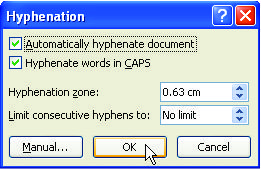
- Klik op OK.
Microsoft® Office 2010
- Klik op Page Layout → Hyphenation → Hyphenation Options.
- Doen die toepaslike instellings in die venster, soos hieronder geïllustreer.
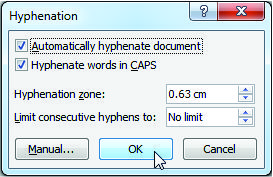
- Klik op OK.
Microsoft® Office 2013
- Klik op Page Layout → Hyphenation → Hyphenation Options.
- Doen die toepaslike instellings in die venster, soos hieronder geïllustreer.
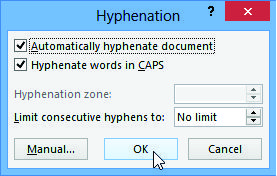
- Klik op OK.
Microsoft® Office 2016
- Klik op Page Layout → Hyphenation → Hyphenation Options.
- Doen die toepaslike instellings in die venster, soos hieronder geïllustreer.
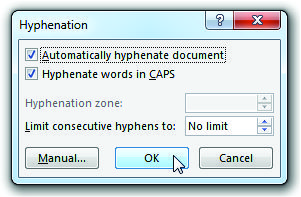
- Klik op OK.
Microsoft® Office 2019 / 365
- Klik op Layout → Hyphenation → Hyphenation Options.
- Doen die toepaslike instellings in die venster, soos hieronder geïllustreer.
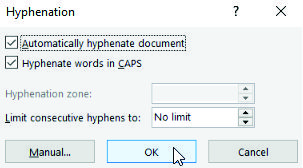
- Klik op OK.